The Reality Check: Why Your Sentinel Costs Are Spiraling
Imagine a client spending £45,000 monthly on Sentinel—90% of it on data they access maybe twice a year for compliance. Sound familiar? With Microsoft's Data Lake preview rolling out and auxiliary logs automatically migrating, it's time to get strategic about data tiers.
After managing a couple of Sentinel environments and seeing the Data Lake in action (yes, I finally got access!), here's your practical guide to optimizing costs without sacrificing security coverage.
The Game Changer: Automatic Mirroring (For Now)
Here's what Microsoft doesn't make obvious enough: any data you send to the Analytics tier is automatically mirrored to Data Lake at no additional cost during preview. This changes everything—for now.
Think about it:
- You're already paying Analytics tier prices for your detection data
- That same data automatically appears in Data Lake for historical analysis
- No extra ingestion costs for the mirrored data (during preview)
- 12-year retention becomes realistic
This automatic mirroring means you're not choosing between tiers—you're choosing your primary ingestion point and getting both. But remember, this is still in preview, so the "no additional cost" could change.
The Current Tier Landscape: What's Actually Available
Microsoft's documentation makes this sound simple, but reality is messier. Here's what I'm seeing in production environments as of August 2025:
What the Screenshots Tell Us: Real Implementation Insights
From the environments I'm managing, here's what's actually happening:
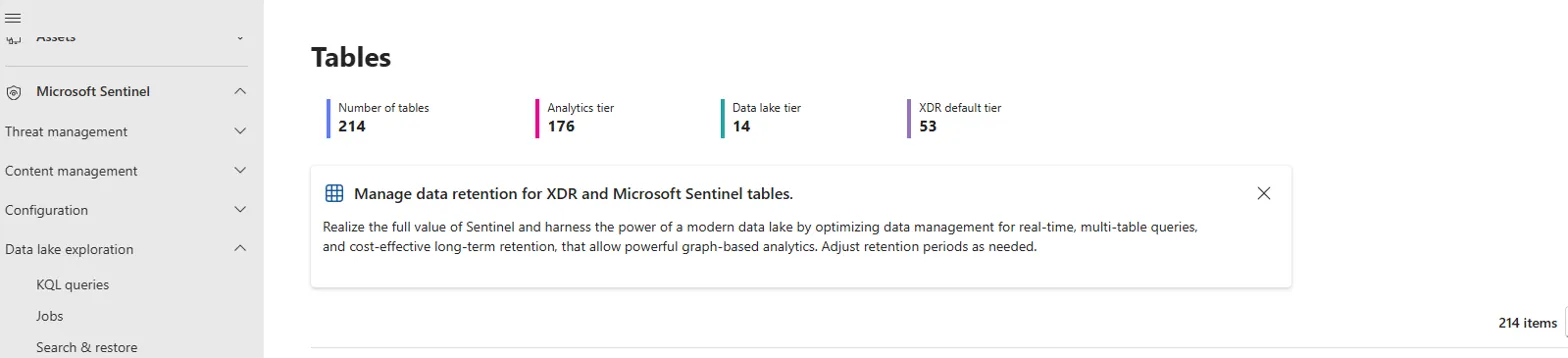
Table distribution in a real Sentinel environment: 176 Analytics, 14 Data Lake, 53 XDR default
1. The Auxiliary Migration Reality
Those auxiliary logs you're relying on? They automatically become part of Data Lake when you enable it. I've seen this across multiple tenants—your CommonSecurityAuxLog_CL tables just migrate to Data Lake without warning.

Auxiliary logs before Data Lake migration - notice the 1 year retention on CommonSecurityAuxLog_CL
What this means:
- No more £0.15/GB ingestion for auxiliary logs
- Automatic migration to £0.05/GB (actually better!)
- They disappear from Defender Advanced Hunting but remain queryable in Data Lake
- No more GUI management in the old interface
2. The Data Lake Tier Management
The new tier management interface is cleaner, but here's what's not obvious:
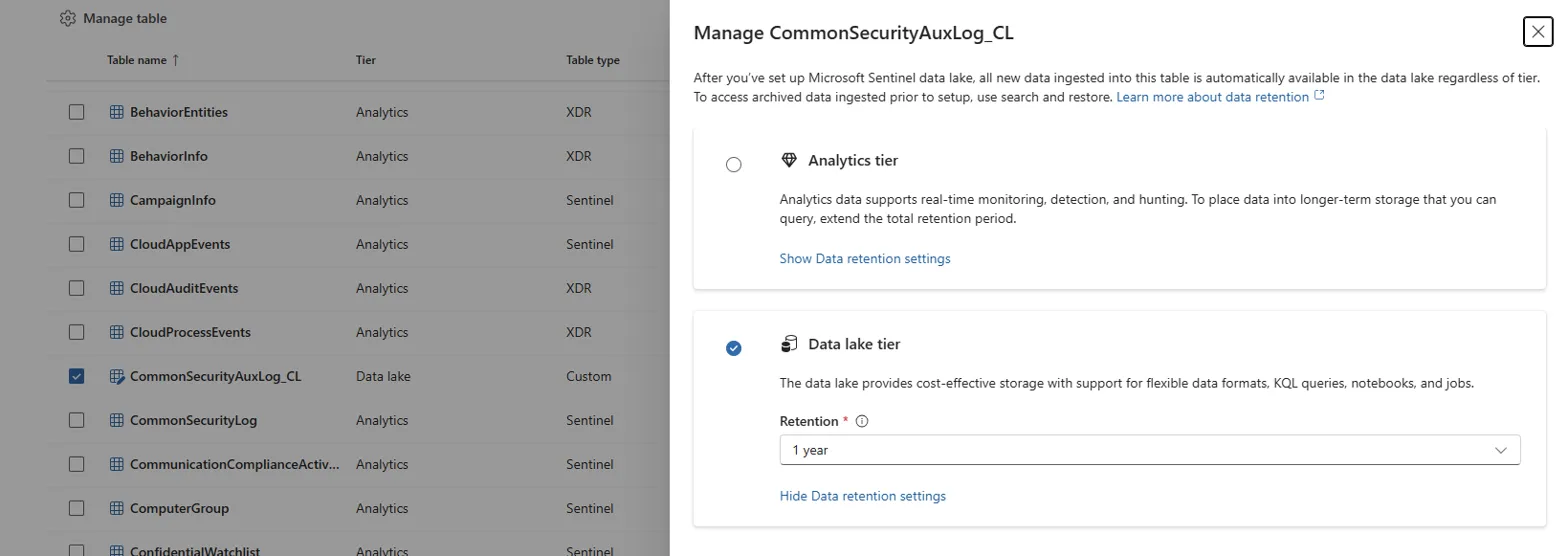
New tier management interface - notice the Data Lake tier selection and retention options
- 214 total tables but only 14 in Data Lake (from my environment)
- You can't manually move tables—it's automatic based on your configuration
- Retention settings are per-table, not global
In some environments that haven't enabled Data Lake yet, you'll see this:
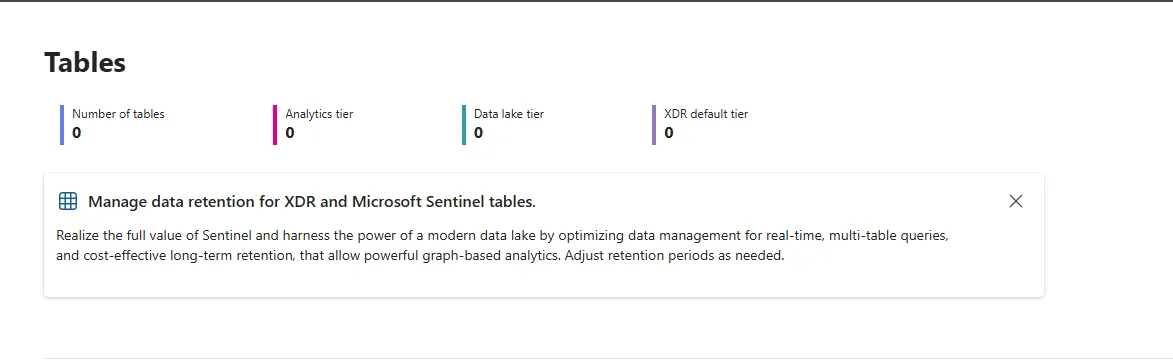
Before Data Lake enablement - all tiers show 0 tables with the setup prompt
💡 Key Insight from the Screenshots
What you're seeing: In environments with Data Lake enabled, auxiliary tables automatically migrate and become part of the lake. The table counts show this isn't theoretical—it's happening right now in production environments.
Cost Optimization Strategy: What Actually Works
Here's the approach that works in practice for optimizing Sentinel costs:
Step 1: Audit Your Current Usage
// Find your expensive tables
Usage
| where IsBillable == true
| where TimeGenerated > ago(30d)
| summarize
    TotalGB = sum(Quantity) / 1024,
    DailyCost = sum(Quantity) * 2.40 / 1024,  // Analytics tier cost
    Records = count()
by DataType
| extend
    MonthlyCost = DailyCost * 30,
    CostPerRecord = DailyCost / Records
| order by MonthlyCost desc
| take 20
Step 2: Classify Your Data
Use this framework for data classification:
- Hot data (Analytics tier): SecurityAlert, SecurityIncident, anything feeding real-time rules
- Warm data (Data Lake): DeviceEvents, EmailEvents, historical hunting data
- Cold data (Archive): Firewall logs, DNS logs, compliance data
Step 3: Understanding the Mirroring Strategy (During Preview)
Here's the key insight: Analytics data is automatically mirrored to Data Lake at no extra cost during preview. This changes your strategy for now:
Current Approach:
- Real-time detection data: Must be in Analytics tier (detection rules only work there)
- High-volume compliance data: Send directly to Data Lake only
- Historical analysis: Use Data Lake for long-term hunting and ML analysis
- Data promotion: Use KQL jobs to promote insights from Lake back to Analytics for detection rules
But plan for changes: Microsoft hasn't committed to keeping mirroring free forever. Use this preview period to test and validate your architecture.
The Gotchas Nobody Tells You About
Here are the issues that will bite you if you're not prepared:
1. Auxiliary Tables Just Vanish (From Old Interfaces)
When you enable Data Lake, auxiliary tables disappear from Defender Advanced Hunting and the Azure portal. They become part of the Data Lake and are only queryable through the new Data Lake exploration in Defender Portal. No warning, no confirmation dialog.
2. The Mirroring Isn't Retroactive
Only data ingested after Data Lake enablement gets mirrored. Your existing Analytics data doesn't automatically appear in Data Lake. Plan your historical analysis accordingly.
3. VS Code Extension and Jupyter Notebooks (Haven't Explored Yet)
Microsoft released a new Sentinel VS Code extension for Python notebooks and ML work. This uses the same Data Lake data and includes managed compute—no need to provision anything yourself. There are also Jupyter notebooks available directly in the Defender portal.
I haven't had time to dive deep into these yet, but the demos show:
- Python-based anomaly detection models
- GitHub Copilot integration for notebook creation
- Scheduled jobs that can promote ML insights back to Analytics tier
- Built-in visualizations and scatter plots for behavioral analysis
This could be where the real value of Data Lake shows up—advanced analytics and ML that wasn't practical before.
4. Cost Alerting Needs Updates
Your existing cost alerts probably monitor Log Analytics ingestion. Add Data Lake monitoring:
// Data Lake cost monitoring query
SentinelDataLakeUsage
| where TimeGenerated > ago(24h)
| summarize
    QueryCostUSD = sum(QueryCost),
    StorageCostUSD = sum(StorageCost),
    TotalGB = sum(DataProcessedGB)
by bin(TimeGenerated, 1h)
| render timechart
The Bottom Line: Is It Worth It?
Short answer: Yes, if you implement it properly.
Long answer: Data Lake isn't just about cost savings—it's about doing security analytics at scale. The combination of 12-year retention, ML capabilities, and notebook integration opens up threat hunting possibilities that weren't feasible before.
But (and this is important): Don't migrate everything blindly. Keep your real-time detection data in Analytics tier. Use Data Lake for historical analysis, compliance, and ML workloads. Remember that detection rules only work on Analytics tier data—you need to promote insights from Lake back to Analytics for automated detection.
Getting Started: Your Next Steps
Ready to optimize your Sentinel costs? Here's what to do next:
- Run the cost analysis: Use the KQL query above to understand your current spend
- Check Data Lake availability: Not all regions have it yet
- Start with non-critical data: Test with firewall or DNS logs first
- Monitor everything: Set up cost alerts and performance monitoring
Let's Collaborate on This
Data Lake implementation is still evolving, and we're all learning together. I've shared what I've discovered so far, but there's definitely more to explore—especially with the VS Code extension and Jupyter notebooks.
Got your own insights? Found different results? I'd love to hear about your experience. Reach out at hello@cy-brush.com or connect with me on LinkedIn.
Let's figure this out together and share what works.
Resources & Further Reading
- Microsoft Sentinel Data Lake Overview - Official documentation
- Introducing Microsoft Sentinel Data Lake - Microsoft Community Hub announcement
- Set up Connectors for Data Lake - Configuration guide
- Why Microsoft's New Sentinel Data Lake Actually Matters - NVISO analysis
- Cybrush Attack Range - Test your detections across tiers
- Cybrush Medium Publication - More Sentinel insights